 |
 |
Showing posts with label Blog Traffic. Show all posts
Showing posts with label Blog Traffic. Show all posts
Thursday, August 30, 2012

1. Write Well and Write Often
Frequently updating your blog with useful content is the first step to building your blog's audience. The content you write is what will keep readers coming back for more. Make sure you have something meaningful to say to them and say it often to maintain their interest and keep them loyal.Furthermore, post frequently to increase the number of chances you have for your blog's content to be noticed by search engines such as Google or Technorati.
Thursday, August 30, 2012 0
Wednesday, August 29, 2012

So you’ve got a blog and you’re picking away at the basics - getting backlinks, optimizing your tags and meta-data and posting to but you’ve yet to see any major spikes in traffic.There are people out there with established audiences which you would love to tap into, but how? These people are bombarded with requests at all hours - how do you get their attention?
Wednesday, August 29, 2012 0
Friday, August 24, 2012

As a blogger, unless your blog serves an online personal diary, building an audience is important. One way to build a loyal audience is to set the right tone for your blog. There is no one right tone for every blog. Being clear on the purpose of your blog and the audience you wish to reach can help you set the proper tone.
Friday, August 24, 2012 0
Friday, February 17, 2012
How to succeed with Adsense?
How can I succeed with Google Adsense? Many of us have this question. I had been using Adsense for more than three years. During this period, I have learnt many do's and dont's of Adsense. Let me share my experience with you.
Adsense Setup and Implementation
Adsense is one of the easiest to implement. Google does not have a very strict policy on approving blogs for Adsense. So, the first step is clear. We do not need any articles on the blog. We do not need to show substantial traffic to start using Adsense. So, the setup is simple. But, how much can you make with Adsense? Is it easy to make money with Adsense? No, it is going to be a very difficult task. If you are using Adsense and expecting results immediately, you may be disappointed. So, what is the trick or secret behind blogs with successful Adsense returns?
Secret of success with Adsense
The secret is simple. "UNDERSTAND how Google Adsense works". Yes, as simple as that. If you don't understand the way Adsense works, you might not be making substantial money with Adsense.
Let me put it in a simple way. Have you played chess? Let me say, you don't know anything about the game of chess. Let me give you a chess board and the necessary coins FREE. Can you win a game straightaway? No. You need to know the rules of the game first. Secondly, you should learn the tricks to make an impact on the game. If you are playing Viswanathan Anand, Garry Kasparov or Vladimir Kramnik with no knowledge of the game, you are going to fail. The success with Adsense is similar. Google provides you a free blogging platform and an easy-to-setup advertising network. But, to succeed, you need to understand the rules and learn the tricks.
Targeted Content Means Targeted Advertisements
Enough on the importance of understanding Google Adsense. My first suggestion is to plan the content of your blog. Google automatically displays advertisements based on what you write. So, the advertisements are going to be related to what you write. The algorithm keeps fine-tuning the advertisements as your blog grows bigger and bigger. If you write about cars, then keep writing about similar content. You can target reviews of cars, news about new cars in the market, compare different brands of cars, write about Toyota, Honda or Mazda. So, Adsense will start to display ads related to cars on your blog.
This is called "Targeted ads". While you establish yourself on the topic you have chosen, you are also moving up the search engine results page and more traffic starts to flow in. These are genuine people who searches for information and comes to your page. If they find the information they want, they just move on. Or, they may click on any related ads. Let me say, I came to your page looking for a review on Honda Civic. If I see an advertisement saying "Good offer for Honda Civic", I might most likely click on this ad. The blogger will be paid a good rate for targeted audience. So, Google will be happy as you are sending a reader who is really interested in the ad.
Conclusion
So, to conclude, choose a niche and write content within that niche. Never work on topics from all around the world in one blog. If you are going to do that, then do not use Adsense. Adsense is for targeted content. Understand this and you have crossed the first obstacle.
Please subscribe to my feed if you like this post
Adsense Setup and Implementation
Adsense is one of the easiest to implement. Google does not have a very strict policy on approving blogs for Adsense. So, the first step is clear. We do not need any articles on the blog. We do not need to show substantial traffic to start using Adsense. So, the setup is simple. But, how much can you make with Adsense? Is it easy to make money with Adsense? No, it is going to be a very difficult task. If you are using Adsense and expecting results immediately, you may be disappointed. So, what is the trick or secret behind blogs with successful Adsense returns?
Secret of success with Adsense
The secret is simple. "UNDERSTAND how Google Adsense works". Yes, as simple as that. If you don't understand the way Adsense works, you might not be making substantial money with Adsense.
Let me put it in a simple way. Have you played chess? Let me say, you don't know anything about the game of chess. Let me give you a chess board and the necessary coins FREE. Can you win a game straightaway? No. You need to know the rules of the game first. Secondly, you should learn the tricks to make an impact on the game. If you are playing Viswanathan Anand, Garry Kasparov or Vladimir Kramnik with no knowledge of the game, you are going to fail. The success with Adsense is similar. Google provides you a free blogging platform and an easy-to-setup advertising network. But, to succeed, you need to understand the rules and learn the tricks.
Targeted Content Means Targeted Advertisements
Enough on the importance of understanding Google Adsense. My first suggestion is to plan the content of your blog. Google automatically displays advertisements based on what you write. So, the advertisements are going to be related to what you write. The algorithm keeps fine-tuning the advertisements as your blog grows bigger and bigger. If you write about cars, then keep writing about similar content. You can target reviews of cars, news about new cars in the market, compare different brands of cars, write about Toyota, Honda or Mazda. So, Adsense will start to display ads related to cars on your blog.
This is called "Targeted ads". While you establish yourself on the topic you have chosen, you are also moving up the search engine results page and more traffic starts to flow in. These are genuine people who searches for information and comes to your page. If they find the information they want, they just move on. Or, they may click on any related ads. Let me say, I came to your page looking for a review on Honda Civic. If I see an advertisement saying "Good offer for Honda Civic", I might most likely click on this ad. The blogger will be paid a good rate for targeted audience. So, Google will be happy as you are sending a reader who is really interested in the ad.
Conclusion
So, to conclude, choose a niche and write content within that niche. Never work on topics from all around the world in one blog. If you are going to do that, then do not use Adsense. Adsense is for targeted content. Understand this and you have crossed the first obstacle.
Please subscribe to my feed if you like this post
Friday, February 17, 2012 0
Type of Traffic Determines Adsense Success
In my earlier post, while replying to Sandy’s comments, I told you that I don’t use Adsense in this blog. In spite of me supporting Google’s Adsense regularly in my posts, why I don’t use it here? I thought I should explain to clarify the doubts that might have cropped up in you.
I have three main reasons for not using Adsense on this blog:
(1) I primarily get traffic from social networking sites
(2) This blog deals with topics with other bloggers as the target audience. The topics generally revolve around blogging tips and make money online.
(3) The poor performing Adsense ads on this blog affected the performance of Adsense ads on my other blogs
How does type of traffic affect Adsense income?
The traffic to any blog generally falls under two major categories, traffic from social networks and traffic from search engines. Likewise, blogs can also be classified into blogs with primarily social traffic and blogs with primarily search engine traffic.
Please take note that Google Adsense does not perform well on blogs with traffic primarily from social networks. This might be one major reason why bloggers like John Chow, Darren Rowse and the likes have not been using Adsense on their blogs. Even though you get huge traffic through social networks, it is not going to convert into clicks. Even if it does, it is not going to produce good returns for you.
Blogging Niche
If you see advertisements related to blogging from Google on your Adsense block, it means you are not doing well as far as Google is concerned. So, the scenario gets worse if your blog itself is on blogging niche. It might look like you are getting targeted ads. Of course, I am blogging about blogs and I should expect ads related to blogging, right? But, Google will still pay you very minimal rates per click. So, it is a proven fact that blogging niche does not perform well with Google Adsense.
One poor performing blog affects the entire network
If you have many blogs under your Adsense account, then you need to watch the performance of each of your blogs closely. Google has a peculiar way of degrading blogs, called “Smart Pricing”. If one of your blog performs badly, then all your blogs will be slapped a kind of penalty and the returns from well performing blogs will start to dwindle. So, if you notice a blog with poor performance, immediately remove the Adsense ads from that blog. This will help in getting good returns from your other blogs. It is a good idea to regularly test all your Adsense blogs for smart pricing.
Conclusion
So, the above reasons summarize my decision not to use Adsense on this particular blog. But, I have other blogs where I still use Adsense and they perform particularly well. Hope that clarifies my support for Google Adsense and still not using it here in this blog. Please subscribe to my feed if you like this post
I have three main reasons for not using Adsense on this blog:
(1) I primarily get traffic from social networking sites
(2) This blog deals with topics with other bloggers as the target audience. The topics generally revolve around blogging tips and make money online.
(3) The poor performing Adsense ads on this blog affected the performance of Adsense ads on my other blogs
How does type of traffic affect Adsense income?
The traffic to any blog generally falls under two major categories, traffic from social networks and traffic from search engines. Likewise, blogs can also be classified into blogs with primarily social traffic and blogs with primarily search engine traffic.
Please take note that Google Adsense does not perform well on blogs with traffic primarily from social networks. This might be one major reason why bloggers like John Chow, Darren Rowse and the likes have not been using Adsense on their blogs. Even though you get huge traffic through social networks, it is not going to convert into clicks. Even if it does, it is not going to produce good returns for you.
Blogging Niche
If you see advertisements related to blogging from Google on your Adsense block, it means you are not doing well as far as Google is concerned. So, the scenario gets worse if your blog itself is on blogging niche. It might look like you are getting targeted ads. Of course, I am blogging about blogs and I should expect ads related to blogging, right? But, Google will still pay you very minimal rates per click. So, it is a proven fact that blogging niche does not perform well with Google Adsense.
One poor performing blog affects the entire network
If you have many blogs under your Adsense account, then you need to watch the performance of each of your blogs closely. Google has a peculiar way of degrading blogs, called “Smart Pricing”. If one of your blog performs badly, then all your blogs will be slapped a kind of penalty and the returns from well performing blogs will start to dwindle. So, if you notice a blog with poor performance, immediately remove the Adsense ads from that blog. This will help in getting good returns from your other blogs. It is a good idea to regularly test all your Adsense blogs for smart pricing.
Conclusion
So, the above reasons summarize my decision not to use Adsense on this particular blog. But, I have other blogs where I still use Adsense and they perform particularly well. Hope that clarifies my support for Google Adsense and still not using it here in this blog. Please subscribe to my feed if you like this post
Widgets for Blogger
Top Droppers Widget for Blogger
Monday, Jan 01, 2012
 In the previous post, we learnt how to install the Recent Droppers widget for Blogger. In this post, I am going to cover the Top Droppers widget for Blogger.
The Top droppers widget is meant to display the links of top droppers from Entrecard on your sidebar. While recent droppers widget will reward every dropper for a short period of time, the top droppers widget will reward only bloggers who consistently drops on you. If you have a good blog, then the droppers will fight hard to get a link from you. In return, you might get regular droppers.
Now, we will see how to install the Top Droppers Widget for Blogger/ Blogspot. If you have followed my instructions to install the Recent Droppers widget, you will find the instructions here very similar.
How to install the widget?
- Log in to your Entrecard account
- Click on the "Statistics" button, located on the top menu.

- Scroll down the Statistics page to a section titled "Top card droppers". You will see an orange colour RSS button besides the title. Click on the feed button.

- This will open a new window. Look at the address bar in your browser window. The address should look like "http://entrecard.com/feeds/top_droppers/XXXXXXXXXX/rss2.0". Copy the address; we need to use this later in Blogger to create the widget
- Now, log in to your Blogger account
- On your Blogger Dashboard, click on the "Layout" link

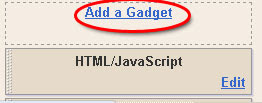
- This will take you to the "Page Elements" tab. Decide where you want to insert the recent droppers widget and click on the "Add a Gadget" link accordingly.
- Scroll down the list, find a gadget titled "Feed" and click on the "+" button

- This will open the "Configure Feed" window. Here, you need to paste the URL copied from Entrecard (Refer to step 4). Click on the "Continue" button
- If you have pasted the feed URL correctly, you should see a prview of your top droppers in the window now
- Blogger allows you to display a maximum of 5 droppers. If you want to display less than 5 links, select the number accordingly. Once you are satisfied, click "Save"


That completes the installation of your Top Entrecard droppers widget. Feel free to post your queries here, if you have any. Please subscribe to my feed if you like this post
Subscribe to:
Posts (Atom)


