 |
 |
Thursday, August 16, 2012
 Sometimes
you want to grab the attention of readers and draw that attention to a
specific link.So here we have a very easy way to add a flashing effect
to specific links on your blog.You have two options, you can have the
link text flashing or add a flashing background.This can be helpful as a
call to action once
you don't go overboard adding it to all links which will just serve to
irritate your readers.Check out the demo (You can see the flashing links
at the top of the sidebar) and tutorial.
Sometimes
you want to grab the attention of readers and draw that attention to a
specific link.So here we have a very easy way to add a flashing effect
to specific links on your blog.You have two options, you can have the
link text flashing or add a flashing background.This can be helpful as a
call to action once
you don't go overboard adding it to all links which will just serve to
irritate your readers.Check out the demo (You can see the flashing links
at the top of the sidebar) and tutorial.Thursday, August 16, 2012 0
Tuesday, August 14, 2012
 How to add adsense ads inside Blogger blog posts or between blog posts:-
Adding adsense ads inside blog posts is a very good thing to do to increase your CTR.
CTR means"(the number of times your ad clicked) divided by (number of times it is shown).So,the more CTR you have,the more $$ you get.
As we know,there are more chances for the ads to be clicked when they are in the middle(blog posts) rather than at the sidebars(especially the right sidebar),footer,etc.So,
Tuesday, August 14, 2012 1
Learn how to hide,disable or remove the blogger navbar(navigation bar) from your blog.
First,let us see what blogger navbar is:

First,let us see what blogger navbar is:


Friends of the blog to writing Some types of files can be shared with friends .. It
Sharing files
However, many sites in Google, the god of the Internet service to us
Provides ..
Sunday, August 12, 2012
 If you have made up your mind to migrate your Google blog to wordpres
safely then redirecting your RSS subscribers and Email subscribers to
Wordpress is a must thing to do. You will need to migrate only if you
have changed your domain or moved your content to a new location or
server. Since in case of blogger to self-hosted wordpress migration,
domain remains the same therefore we will only need to redirect the
Feed. Moving your bulk of readers from one platform to another is
linked with your blog Feed address. BlogSpot blogs support both RSS and
atom Feeds whilst wordpress supports RSS web Feeds alone (though you can use plugins to switch to atom).
What we will learn today is to simply change the FEED address and let
your readers to receive email updates via your new blogging platform.
This method will shift your syndication from one network to another
without losing a single subscriber. The steps are clearly demonstrated to make your job easy. Lets get things moving!
If you have made up your mind to migrate your Google blog to wordpres
safely then redirecting your RSS subscribers and Email subscribers to
Wordpress is a must thing to do. You will need to migrate only if you
have changed your domain or moved your content to a new location or
server. Since in case of blogger to self-hosted wordpress migration,
domain remains the same therefore we will only need to redirect the
Feed. Moving your bulk of readers from one platform to another is
linked with your blog Feed address. BlogSpot blogs support both RSS and
atom Feeds whilst wordpress supports RSS web Feeds alone (though you can use plugins to switch to atom).
What we will learn today is to simply change the FEED address and let
your readers to receive email updates via your new blogging platform.
This method will shift your syndication from one network to another
without losing a single subscriber. The steps are clearly demonstrated to make your job easy. Lets get things moving!Sunday, August 12, 2012 0
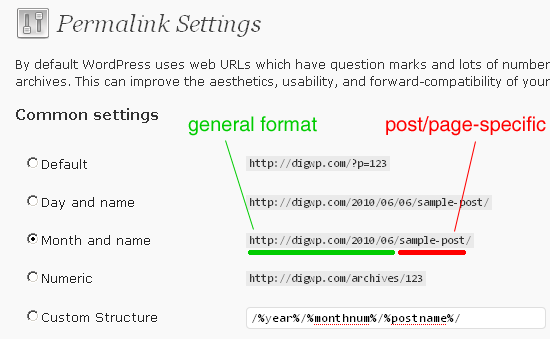 With the introduction of Custom permalinks in blogger,
you now have a great opportunity to utilize this new feature to improve
the usability, aesthetics and forward-compatibility of your links. It
also helps you to target your rich keywords. I wrote a detailed tutorial
when Custom Permalinks were first introduced in Blogger draft on June
25th 2012. Permalinks can now be seen on blogger.com also. We
highlighted several areas of this feature by discussing Character limit,
what Characters are accepted, good and bad permalink practices but
after observing the permalink keyword structure in majority of blogs, I
felt the necessity to explain its importance more because newbies are
really not using it the correct way in order to drive traffic from
Search engines. Just like a title tag, permalinks are also now a victim
of keyword stuffing. The Character limit for a permalink is different
for both Google, Bing and Yahoo. Understanding this restriction is what
we will learn today. You will also learn today why You should always follow Mashable but not always TechCrunch when you talk of SEO.
With the introduction of Custom permalinks in blogger,
you now have a great opportunity to utilize this new feature to improve
the usability, aesthetics and forward-compatibility of your links. It
also helps you to target your rich keywords. I wrote a detailed tutorial
when Custom Permalinks were first introduced in Blogger draft on June
25th 2012. Permalinks can now be seen on blogger.com also. We
highlighted several areas of this feature by discussing Character limit,
what Characters are accepted, good and bad permalink practices but
after observing the permalink keyword structure in majority of blogs, I
felt the necessity to explain its importance more because newbies are
really not using it the correct way in order to drive traffic from
Search engines. Just like a title tag, permalinks are also now a victim
of keyword stuffing. The Character limit for a permalink is different
for both Google, Bing and Yahoo. Understanding this restriction is what
we will learn today. You will also learn today why You should always follow Mashable but not always TechCrunch when you talk of SEO.
Subscribe to:
Posts (Atom)


